
We’re Transitioning to a New Payment Service to Better Serve You
To pay online please look at your policy number as it appears on your bill or insurance documents. Does your full policy number include a dash with three numbers following at the end?
Select the button below to make a payment:
New (Policy No. has -000) Legacy (Policy No. has No dash) Policy Number ExamplesNew Policy Pay:
If you are a NEW policyholder, make your first premium payment online with your quote number.
Make New Policy Payment
Argo Group:
Policyholders with a Massachusetts-only policy or Connecticut-only policy can use the Guest Pay option or call PSN at 833-326-7022.
New or Legacy?
All policies in the online portal display in the dash format, so use the policy number on your printed invoice or follow the date criteria below to determine which payment button to select.
Legacy System: Policies written before 9/1/2026 or renewed before 11/1/2026
New System: Policies written on or after 9/1/2026, or policies renewing on or after 11/1/2026
Policy Number Examples
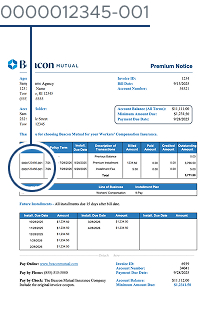
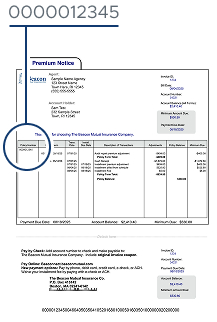
Don’t know your policy number? Call us as 401-825-2995 or send us an email to info@beaconmutual.com.
Still unsure? You can view your policy and invoice by logging into the secure online portal and navigating to the Billing Account page.
How to Make a Payment
This brief video shows you how to make a payment online through the Beacon Mutual Online Portal.
Log in to the Online Portal